Britain · UK News Post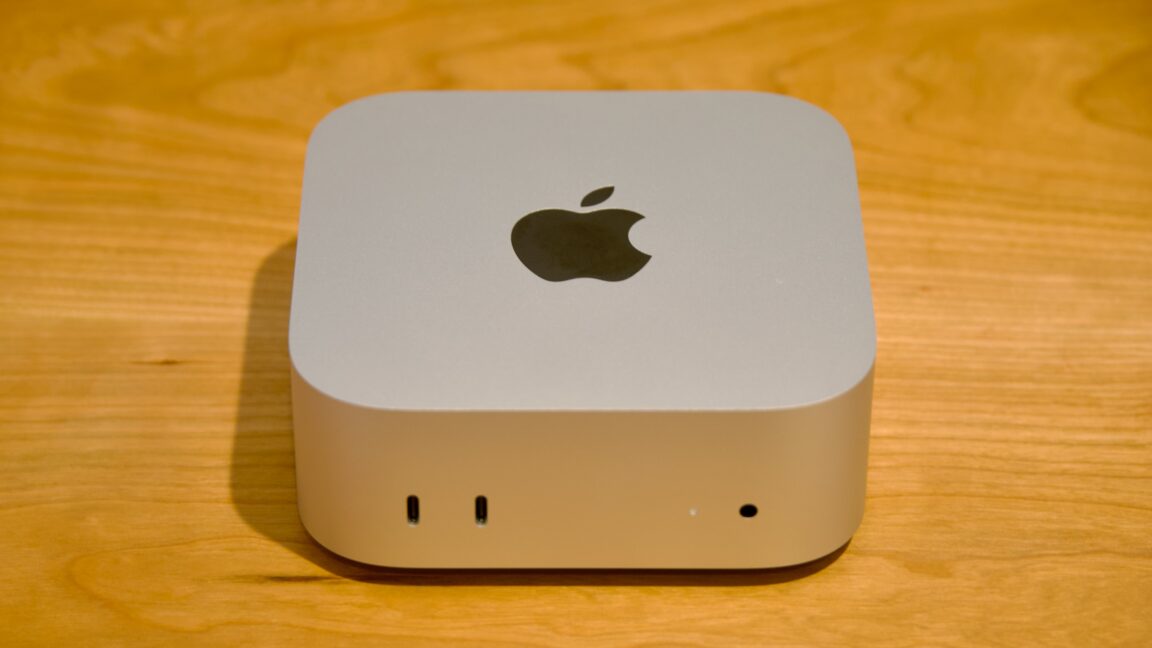
price tag not so mini Apple Mac mini review: The new M6 impresses, but the price hike is rough The M4 Mac mini was one of Apple’s best values ever. This one, not so much. Apple's M6 Mac mini.
Credit: Andrew Cunningham Apple's M6 Mac mini. Credit: Andrew Cunningham The new Mac mini is the kind of Mac upgrade Apple has done a million times. It’s the same design as before but with new guts.
These play-it-safe updates aren’t very exciting, but they’re also usually all upside—you get a year or two’s worth of technological improvements for the same price you would have paid for the older version yesterday. Unfortunately, 2026’s unprecedented memory crunch has upended that standard operating procedure. The new Mac mini starts at $899 for a version with 16GB of RAM and 256GB of storage, a $300 increase for the same memory and storage specs you could get in the $599 M4 Mac mini in 2024.
The M4 Mac mini was a great general-purpose desktop computer and one of the best values Apple had ever offered in a desktop Mac. The M6 Mac mini is only one of those things. I’ll let you guess which.
Note that this review is specifically for the M6 version of the Mac mini. We didn’t get an M5 Pro Mac mini to review, but we’ll talk more about how its pricing and performance fits in for our Mac Studio review. Design The M4 Mac minis gave the computers their first full redesigns in nearly 15 years, so it’s not too surprising that the new Mac minis don’t change anything.
Compared to the older Intel and M1/M2-era versions, they’re slightly taller (2 inches, up from 1.4), but they have a smaller 5×5-inch footprint (down from 7.7 inches squared). The system is actively cooled, with a fan vent on the bottom to make sure that whatever chip is inside can run at high sustained clock speeds (passively cooled Apple Silicon Macs like the MacBook Air have always been a bit slower than actively cooled Macs with the same chip). All Mac minis have two 10 Gbps USB-C ports and a headphone jack on the front, and a 2.5 Gbps (default) or 10 Gbps (optional) Ethernet port and HDMI port on the back.
Both also have three Thunderbolt ports on the back, but these are Thunderbolt 4 on the M6 Mac mini and Thunderbolt 5 on the M5 Pro version. That means the M6 mini’s ports top out at 40 Gbps, while the M5 Pro mini supports up to 120 Gbps speeds. The Mac mini’s ports.
No USB-A, but otherwise not bad for a system this small. Credit: Andrew Cunningham The Mac mini’s ports. No USB-A, but otherwise not bad for a system this small.
Credit: Andrew Cunningham Realistically, there aren’t a ton of things on a Mac that can use all that bandwidth, especially since Apple doesn’t support external GPUs. But you do need a Thunderbolt 5 Mac to daisy-chain multiple computers together to form a compute cluster, so if that’s something you’re interested in, keep it in mind when you buy—maybe you’re buying multiple desktops, or maybe you already have an M5 Pro or M5 Max MacBook Pro you’d like to test the feature with. The only real gripe with this design continues to be its bottom-rear-mounted power button; apparently, complaints about this are being sent to the same trash can Apple has always used for complaints about the Magic Mouse’s bottom-mounted charging port.
It doesn’t come up often in everyday use if you just let your Mac go to sleep rather than shutting it down. But the positioning problem does really call attention to itself when you pair a TouchID-equipped external keyboard with the mini, since it requires a quick double-tap of the Mac’s power button before the sensor will work. Meet the M6 Apple’s first M6-series chip is making its debut in the humble Mac mini, and the chip looks like the biggest upgrade Apple’s lower-end chip has gotten since the M4 generation added extra efficiency cores.
The headliner is the presence of two of Apple’s so-called “Super” cores , Apple’s nomenclature for P-cores that are even faster than its typical P-cores. Those are added on top of four P-cores and six E-cores for a total of 12 CPU cores. M4 and M5 both had 10 CPU cores.
In the M4, these were split between four regular P-cores and six E-cores, whereas the M5 split them between four super cores and six E-cores (the M5’s cores were referred to as P-cores when it launched but were rebranded later when the M5 Pro and Max came out). The M1, M2, and M3 generations all used four P-cores and four E-cores. The M6 has fewer super cores than the M5 but the same number of E-cores and four additional P-cores.
While they’re apparently no longer “super,” the P-cores still perform well enough to ensure that the M6’s multi-core performance is better than M5’s overall. CPU S/P/E-cores GPU cores RAM options Display support (including internal) Memory bandwidth Apple M6 2S/4P/6E 12 16/24/32GB Up to three 153GB/s (16GB), 170GB/s (24GB/32GB) Apple M5 4S/6E 10 16/24/32GB Up to three 153GB/s Apple M4 4P/6E 10 16/24/32GB Up to three 120GB/s Apple M3 4P/4E 10 8/16/24GB Up to two 102.4GB/s Apple M2 4P/4E 10 8/16/24GB Up to two (one external) 102.4GB/s Apple M1 4P/4E 8 8/16GB Up to two (one external) 68.25GB/s (est.) Apple has mixed super cores with both other kinds of cores before, but this is its first chip to include all three kinds at once. To get around the awkwardness this might create at the CPU scheduler level, the built-in powermetrics tool suggests that Apple is still treating the M6 like a chip with just two types of cores.
The six E-cores are all gathered together in one cluster, and the two Super cores and the four P-cores are all lumped together into a second six-core cluster called the “PS cluster.” Powermetrics also reports that both the P- and S-cores have the same peak and minimum clock speeds, unlike in the M5 Pro and M5 Max where they’re different clusters with different clock speeds (both P- and S-cores in M6 range from 1.44 GHz to 4.79 GHz). The sysctl utility also suggests they share the same 20MB pool of L2 cache, up from 16MB for the 4-core Super cluster in the M5 (the E-core cluster has a bit more L2 cache, too, 8MB up from 6MB in the M5). The Super cores do have more L1 instruction and data cache, so they are definitely still different cores, and there are likely other differences that we can’t detect using software-level tools.
But if you were wondering how macOS was going to treat a chip with three different kinds of CPU cores at a software level, the answer is “to act like it still has two different kinds of cores.” L1 instruction cache L1 data cache L2 cache Minimum clock Maximum clock M6 E-core 160KB 128KB 8MB shared between 6-core cluster 1,010 MHz 2,908 MHz M6 P-core 128KB 64KB 20MB split between P- and S-cores 1,440 MHz 4,788 MHz M6 Super core 192KB 96KB 20MB split between P- and S-cores 1,440 MHz 4,788 MHz The M6 gets additional GPU cores for the first time since the M2, increasing the count from 10 cores to 12. These cores include improved versions of the integrated neural accelerators Apple introduced in the M5-series GPU for speeding up AI and machine-learning workloads like ray-tracing and MetalFX upscaling. A “Dual 16-core Neural Engine” also bumps the number of Neural Engine cores from 16 to 32.
Saying you have 2×16 of something strikes me as a roundabout way of saying you have 32 of something, but I suppose the end result is the same either way. One small wrinkle in the M6 variants the Mac mini uses: The basic 16GB Mac mini offers 153 GB/s of memory bandwidth, the same amount as the M5. The 24GB and 32GB versions offer 170 GB/s, an 11 percent increase that should marginally improve graphics performance and the speed of any local AI models you run on this machine.
Our review unit is the 24GB version. What of the M6 Pro, M6 Max, or M6 Ultra? If the rumors are true, the M6 could end up being a lonely chip.
Bloomberg’s Mark Gurman reports that Apple isn’t planning a full M6 chip generation and that it could skip directly to M7 branding for the Pro, Max, and Ultra chips. That would be a first for the company, which skipped shipping an M4 Ultra but has otherwise shipped a baseline, Pro, and Max-series chip in each generation so far. But it makes sense for a couple of reasons.
The first is that most of the M6’s gains can be attributed to its extra CPU and GPU cores relative to the M5, and the M5 Pro, M5 Max, and M5 Ultra all obviously still have more of both kinds of cores than the M6 does. The second is that it’s still pretty early for TSMC’s 2 nm process, following three generations where Apple used versions of TSMC’s 3 nm process, and Apple is probably fighting with every other fabless chipmaker on Earth to reserve capacity. Apple could be sticking with smaller, simpler 2 nm chips for now and saving its bigger and more complex chips for later, when capacity will be higher, yields will be better, and costs may be lower.
Performance The new mini re-uses the launch strategy for last year’s Mac Studios, which used an M4 Max in the base model and an M3 Ultra in the top-tier configurations. The basic Mac mini uses the brand-new M6, while the semi-professional Mac mini tier gets the M5 Pro that we saw in MacBook Pros back in the spring . This means the M6 mini has newer tech than the more-expensive M5 Pro mini—and marginally better single-core CPU performance, too.
The M6’s single-core is roughly 8 to 10 percent faster than the M5 family’s in our benchmarks; graphics performance is also up by roughly 10 percent. In multi-core CPU benchmarks, the M6’s performance is roughly 20 percent faster than the M5. But for heavy multi-core performance, having more cores is still more important than using the newest cores.
The M5 Max (which uses the same 18-core CPU block as the M5 Pro, so it’s a decent stand-in) is still generally 60 or 70 percent faster than the M6 in our multi-core benchmarks. If you’re comparing the last-generation mini to this one, the upgrades over the M4 are pretty substantial. Single-core CPU performance improves by between 20 and 30 percent in most tests, while both graphics performance and multi-core CPU performance are up by between 50 and 80 percent—and occasionally even more, in some tests.
The M6 does nearly as well as the M4 Pro in the Blender benchmark and beats the M5 by around 40 percent, again suggesting that this benchmark in particular is benefiting from the GPU cores’ built-in Neural Accelerators. Usually at this point we would talk about the chip’s estimated power consumption using the powermetrics tool, a built-in utility that gives clock speed and power consumption data for the CPU and GPU cores in Macs. This is a software-based reporting tool, which makes it imperfect for comparisons between chip generations.
But it does at least give us some vague estimate of Apple’s power efficiency. For the M6, powermetrics doesn’t actually report CPU power levels. It appears in the tool’s logs, but the value is always “0.” I’ve asked Apple whether this is a bug or an intentional behavior change (it still works fine for M5-generation chips), and I’ll update this if I get a response.
About that price The $599 M4 Mac mini was a tiny, affordable desktop computer with as much speed and memory as most people need for general-purpose computing. You could quibble with the 256GB base storage, but it was still the most usable the basic Mac mini had ever been. The M6 mini’s $899 starting price sets us way back.
That’s a $300 increase in just under two years for a computer that has a faster chip in it but otherwise shares the key specs and most of the capabilities. One could argue that this merely resets Mac mini pricing back to where it was circa 2020. A base M1 Mac mini cost $699 to start, and upgrading to 16GB of RAM added another $200.
It just feels like a big step back, given how great the M4 mini was. If you need a desktop computer right now for anything from basic browsing to less-intensive local AI models, this is still Apple’s most affordable computer (chatbots and image generation should run pretty well on it; more intensive coding-centric models will be a bit squeezed for RAM and memory bandwidth, even at 32GB). And even the $599 M4 mini was undercut by the kind of lowest-common-denominator cheap mini PCs you could get on Amazon.
It’s just hard to swallow the current price, given how much better it was not all that long ago. The good An impressively fast and quiet little computer that can fill roles from “entry-level desktop” to “midrange coding and video editing rig.” M6 is a big step up for Apple’s entry-level chip, with more CPU and GPU cores and other improvements. Large improvements over the M4 mini, thanks to a two-generation silicon jump.
The bad Zero upgradability, aside from what you can add with external accessories. What you buy is what you have until you buy the next thing. 256GB of storage in the base model is low, especially if you want to play games or run any kind of AI models locally. Power button on the bottom is mildly inconvenient on the occasions you have to interact with it.
M6 version can’t be daisy-chained together with Thunderbolt 5 to join a compute cluster. The ugly The memory crisis means we can’t have nice things unless we’re willing to pay out the nose for them. Andrew is a Senior Technology Reporter at Ars Technica, with a focus on consumer tech including computer hardware and in-depth reviews of operating systems like Windows and macOS.
Andrew lives in Philadelphia and co-hosts a weekly book podcast called Overdue . 4 Comments
Source: Ars Technica